Empty State UI

What is an empty state?
An empty state occurs when there is no data to display to users.
An empty state screen is used to prompt the user to take action or provide input when there is no existing data or content to display. This is often seen when a user first signs up for an app or when they have no previous saved content.
Without an empty state, users will stumble into an empty screen and it might frustrate users when they encounter a dead end or poor onboarding experience. This might result in reduced activation or engagement rates - and consequently, lower conversion and revenue metrics.
There are many different types of empty states that may be used in various parts of the user journey, including but not limited to:
First-time use: Empty state that introduces users to your app when no data has been created yet, or no action has been taken.
No results found: Empty state for search or filters that yield no results.
Post completion empty state: Empty state to delight users when they complete a task.
Feature education: Provides contextual tips or educational content to guide users when they discover a new feature that hasn't been used yet.
Visually, the empty state screen will often contain a message or visual cue that prompts the user to take action. The screen may also include a button or form for users to input information.
In this article, we will go through the do's and don'ts of empty state screens, and 4 real-life examples of how the top companies design empty state screens, sourced directly from Mobbin's database with over 4,000+ empty state examples.
Empty states: Dos and don'ts for a better UX
Here are a few quick tips on what to look out for and what to avoid when designing a basic empty state screen.
4 empty state screen examples to inspire you
Here are 4 unique empty state examples that we've found on Mobbin that might inspire you.
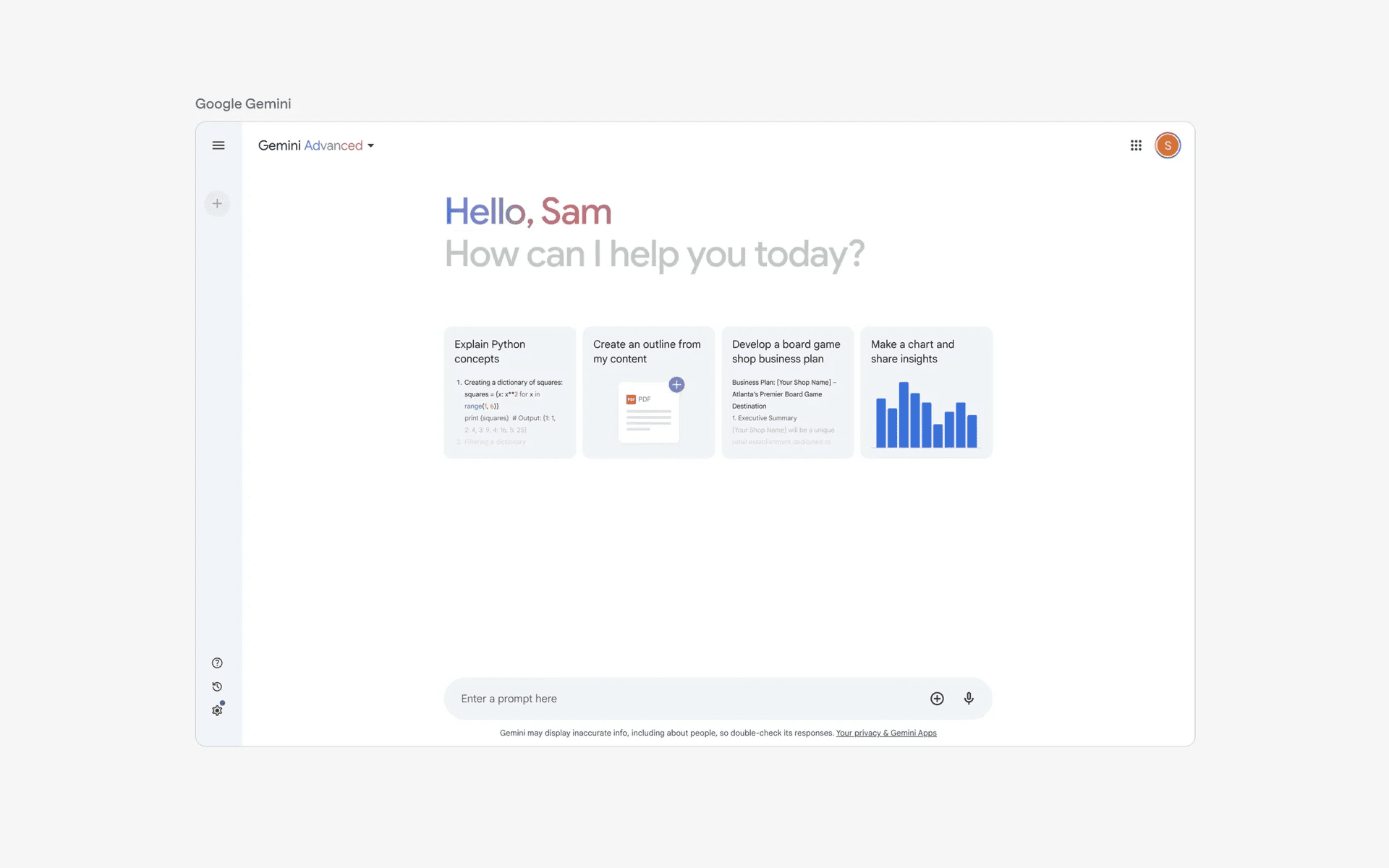
1. Google Gemini: First-time use empty state
Google Gemini first time use
Gemini is Google's answer to ChatGPT - an advanced AI model with a chatbot like interface.
When first time users encounter Gemini, they are directed to a clean empty state interface as shown above, which has a clear header: "Hello, Sam. How can I help you today?" This header makes the AI chatbot feel more approachable and friendly.
This is followed by four Cards each with a different call to action. These four prompts are likely chosen to showcase a broad variety of actions that the AI model can be used to solve user problems.
This is a great example of an empty state since it helps set up the user journey for success - someone new the an AI chatbot might not know what is possible, and new users are almost guaranteed to fail without such a well thought out design.
2. Airbnb: No results found empty state
Airbnb no results found
Airbnb is a brand that all designers know and admire. It is well known for it's design culture fostered by co-founders Brian Chesky and Joe Gebbia.
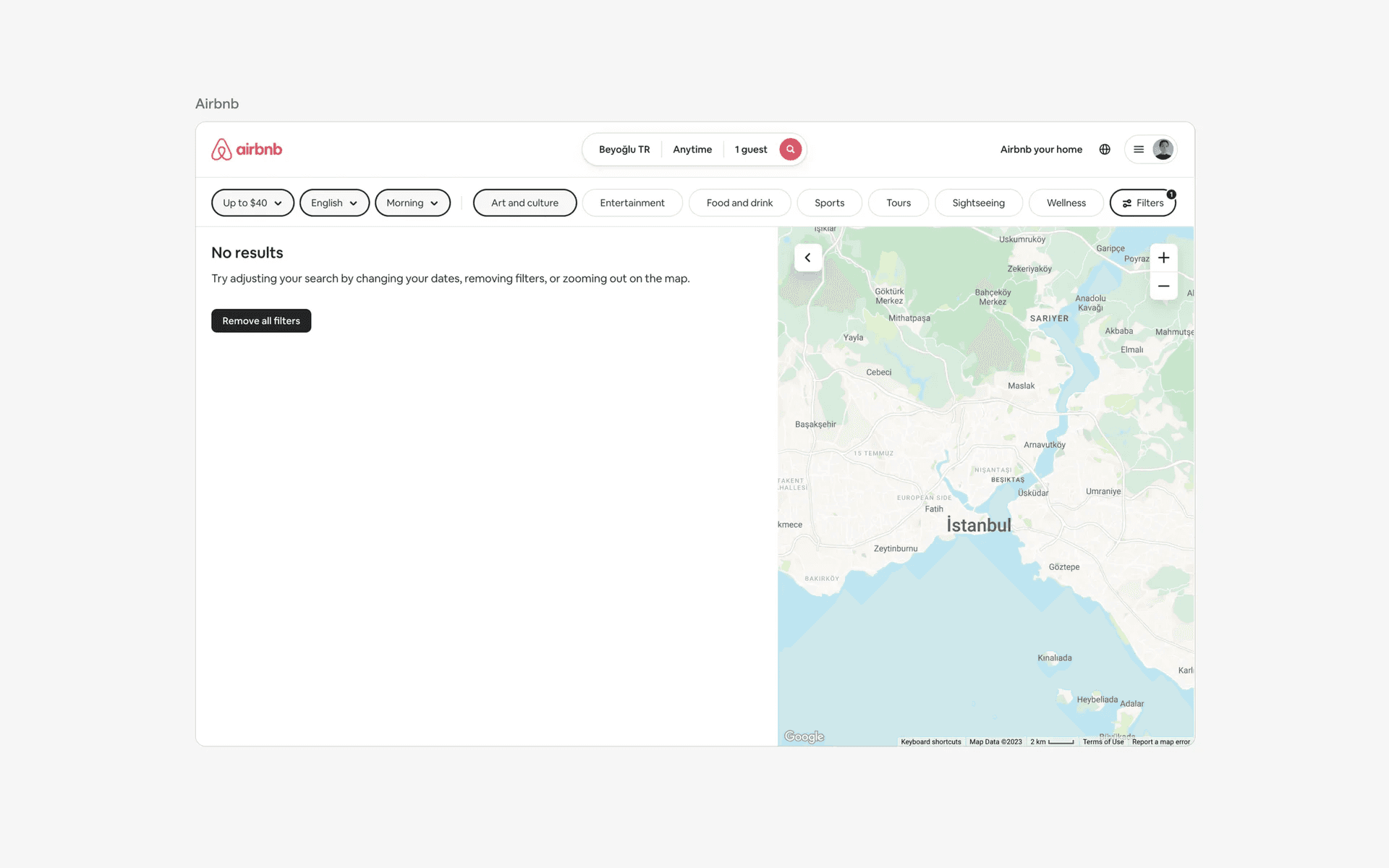
This empty state example shows a search results with 'no results'. It is a common design pattern for any app that prioritises its search experience.
You can think of Airbnb as a search engine for 'other people's houses to live in'. As there is a limited supply of houses, it is likely that some filter options inevitably lead to no valid results. Now, imagine if this just led to an empty screen, users will be confused at this point, and won't know what to do next.
Airbnb has clear and concise copy that tells the users that there are no results for this filter combination, and has a call-to-action to get users to remove all filters and input new ones.
3. GitHub: Post completion empty state
Github post completion
GitHub is a platform for version control and collaboration, allowing developers to host, review, and manage code.
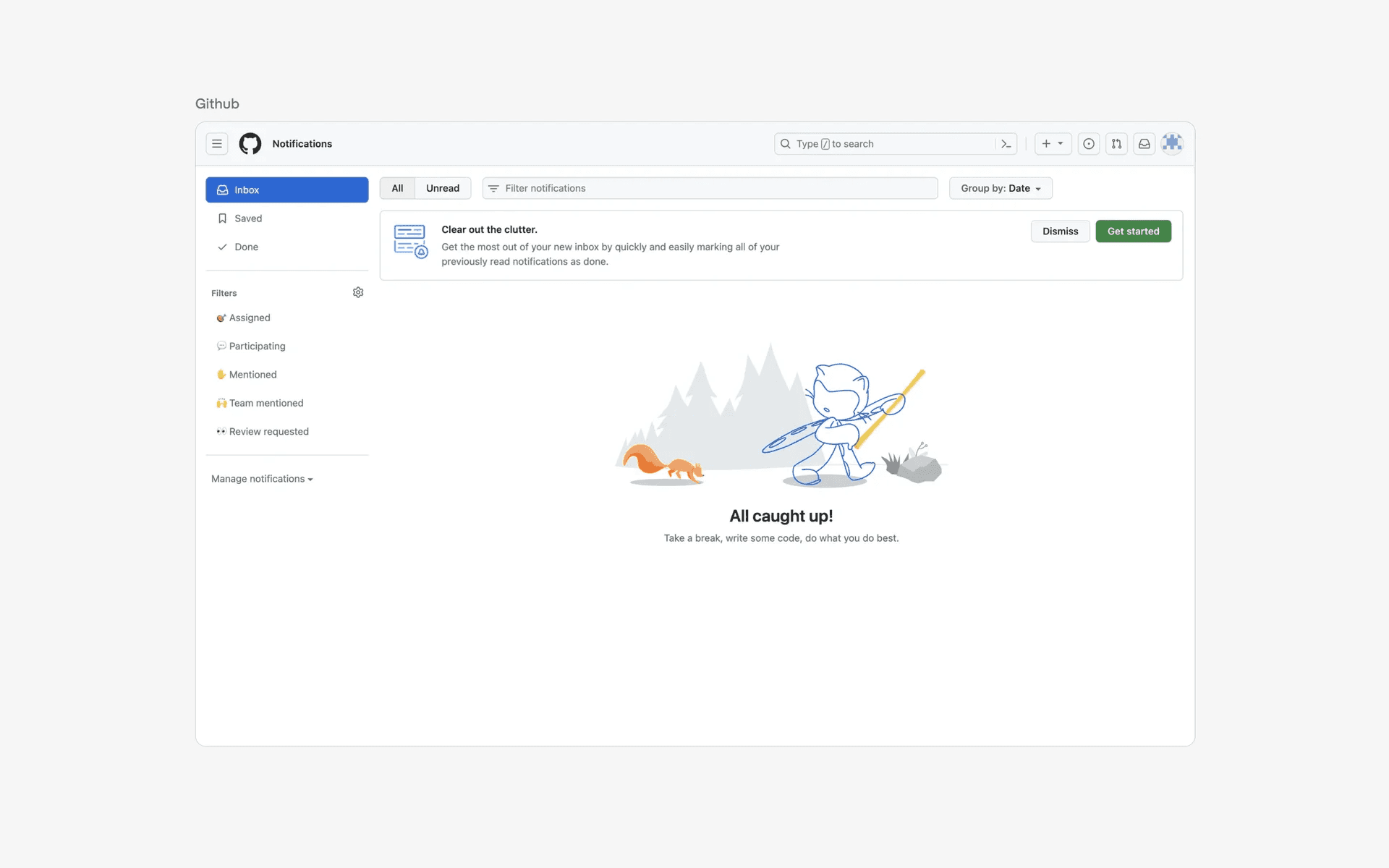
This example shows an empty inbox after the user cleared all their outstanding tasks.
This is also known as a post completion empty state, which is a variant of empty state design that is designed to delight and reward users when they complete tasks. As you can see from the above screenshot, the copy is encouraging users to take a break and has an illustration showing the GitHub mascot going for a walk in the forest.
This empty state is commonly found in email & productivity apps where tasks may be tedious (like clearing emails) - so much so that the term 'Inbox Zero' has been made a popular design paradigm in recent days.
4. Linear: Feature education empty state
Linear feature education
Linear is a project management tool designed to help teams streamline workflows, track tasks, and collaborate efficiently. They are known for their attention to details and craft.
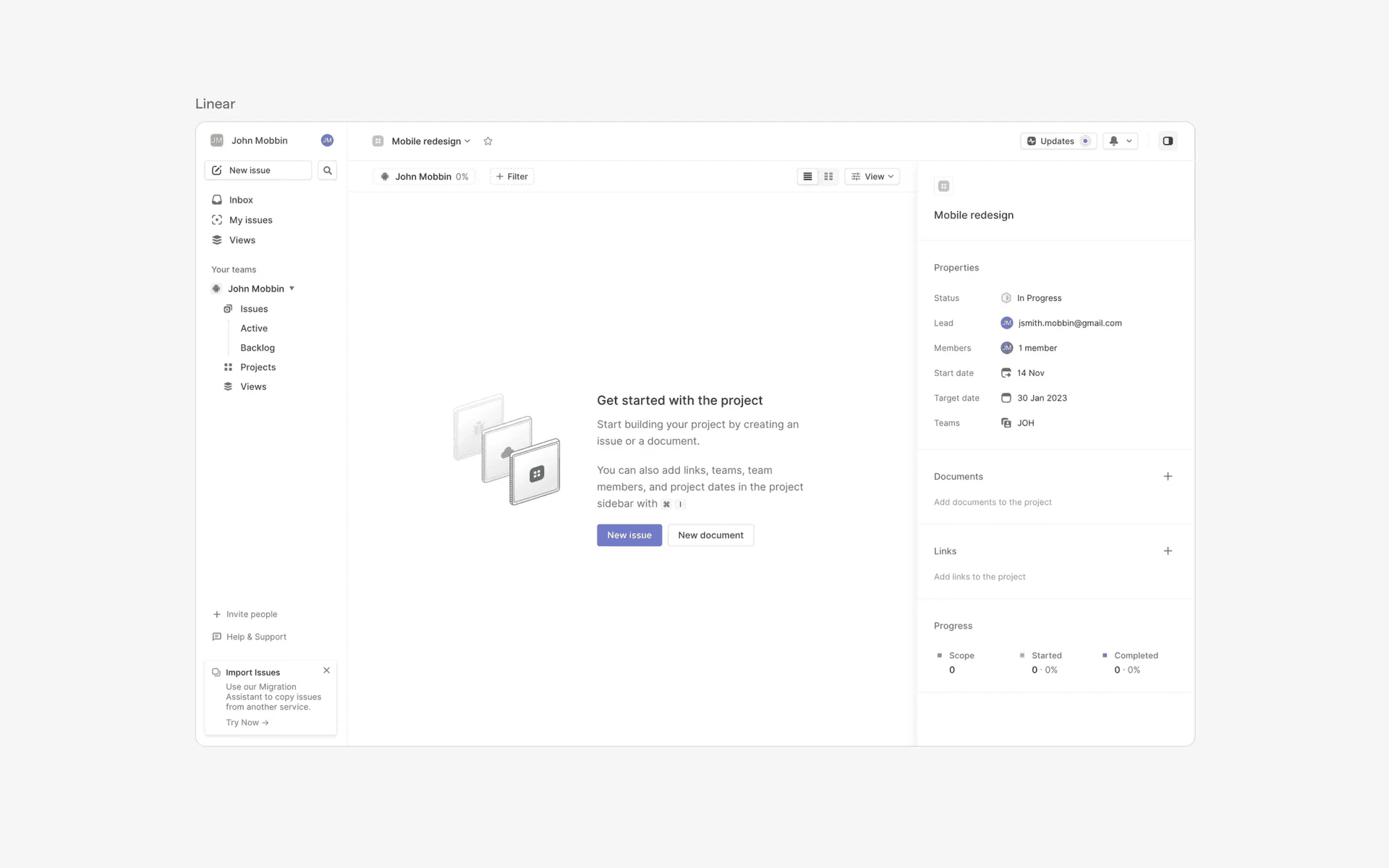
This is a good example of a new feature education empty state. As users start to engage with your app, they may run into new features throughout their journey - empty states such as this one are designed to help users understand new features and why they should use it.
In this case, a user stumbles into the 'Projects' feature. The empty state helps to provide guidance to get started by providing context through clear and effective copywriting, while providing a primary call to action button ("New issue") and a secondary action ("New document").
FAQs
Why are empty states important in UX design?
Empty states provide opportunities to:
Guide users on how to engage with the app
Educate user about features
Prevent user confusion or product dead ends
Error messages help users understand and resolve issues, improving usability and reducing frustration. They guide users back on track, ensuring tasks are completed efficiently.
What are the best practices for empty state design?
An effective empty state includes:
Context: Clearly explains why the screen is empty.
Guidance: Offers actionable next steps to resolve state.
Visual appeal: Includes engaging visuals or illustrations.
How about empty states caused by errors?
One common design pattern that is both an empty state AND error screen is the 'no internet connection' screen. In this case, follow the above guidelines.
Context: We are unable to connect to the internet, please reconnect and try again.
Guidance: "Try again" button
Visual appeal: Illustration or icon that clearly indicates no internet connection.
Consistency: Make sure that your icon, illustration and text aligns with your app tone, brand and design style.
How can empty states improve the user onboarding experience?
It is common to see empty states in onboarding flows for new users in SaaS products, especially if it requires the customers to connect to take a critical first step to activate their account. This is sometimes also known as 'product activation'.
A well designed empty state is very crucial at this stage, and it can make or break your product's key metrics.
Should every empty state have an action button?
Not always. You should include action buttons whenever it makes sense to - for example, for actions where users can take immediate action to resolve the empty state.
However, informative states might not require action. For example, "You're all caught up!" in email software.