Back to changelog
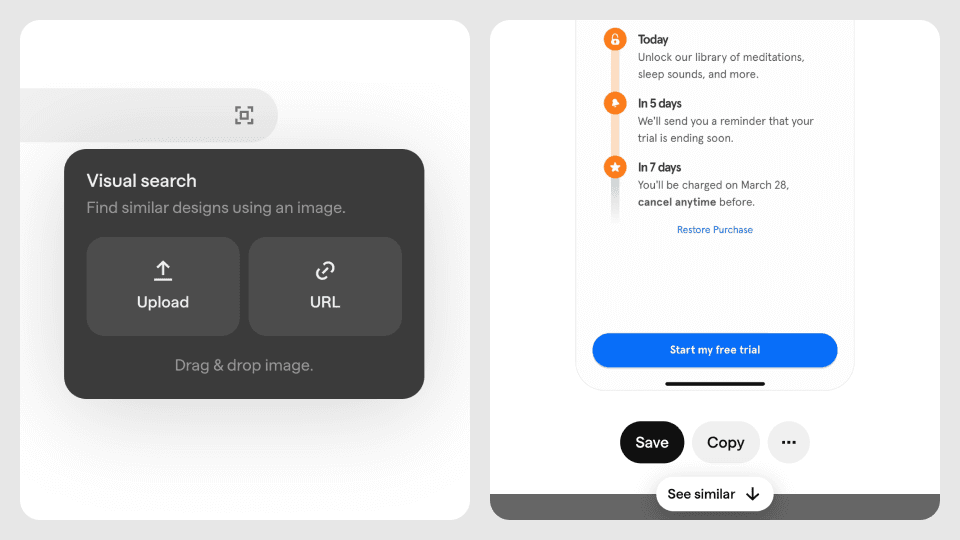
Visual search and similar screens
For the longest time, searching for content on Mobbin has been a text-based experience. Your search results are only as good as your ability to describe what you're looking for. With the introduction of visual search and similar screens*, we're changing this.
See something you like outside of Mobbin? Screenshot it and use our new visual search feature to find visually similar screens on Mobbin.
Found a screen you like on Mobbin and want to see similar ones? Simply click on the screen and scroll down to browse visually similar screens.
These seemingly simple features have been in the works for a while now, and we're excited to finally launch them. They're definitely not perfect yet, and so we hope to hear your feedback to help us continuously iterate and improve them.
Other improvements
You can now browse your previous searches in the search bar.
You can now hover on app logos and names to get a quick preview of the app.
When viewing a screen, you can now click anywhere on the screen to zoom in.
We've added a setting for Pro users to hide screen footers when copying or downloading screens.
We've improved the design of our app cells to ensure content is more breathable and videos now auto-play as well.
We've improved the design of our flows cells to make them easier to scan and more consistent with other content types on Mobbin.
We've improved the visual contrast of dropdowns and popovers on Mobbin.
Fixes
Fixed an issue where app cell videos were auto-playing even for reduced motion users.
Fixed an issue where scrolling through flows on Firefox was sometimes jumpy.
* Visual search and similar screens are currently only available for iOS and Android screens.